Topic 8: HTTP Methods & Status Codes in Express
## 1. Problem Statement
### Case Study: The Neighborhood Food Store Network
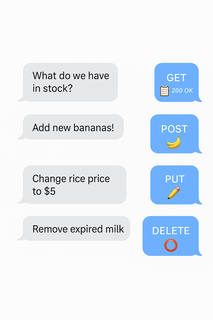
You manage a group of neighborhood food stores. Every day, staff and customers need to:
- Look up what products are available.
- Add new items to the inventory.
- Update details about existing products.
- Remove items that are no longer sold.
If requests get mixed up or answers are unclear, staff and customers get confused, orders are delayed, and the stores lose business.
 ### The challenge:
How do you organize and handle these different requests so that everyone always gets the right answer, and nothing falls through the cracks?
---
## 2. Learning Objectives
By the end of this lesson, you will be able to:
- Organize and implement all types of requests (looking up, adding, changing, removing) in Express.
- Use and explain HTTP status codes for clear communication.
- Add and read headers for extra information and control.
- Write robust, RESTful endpoints for any resource.
- Understand the difference between GET, POST, PUT, PATCH, and DELETE.
- Know when to use each status code, and why.
---
## 3. Concept Introduction with Analogy
### Analogy: The Restaurant Waiter
Imagine you’re at a restaurant:
- You can ask the waiter for the menu (look up).
- You can place a new order (add).
- You can change your order (update).
- You can cancel your order (remove).
The waiter always responds clearly:
- “Here’s your menu.” (success)
- “Your order is ready!” (success)
- “Sorry, we don’t have that item.” (not found)
- “Order cancelled.” (removed)
- “Could you clarify your request?” (bad request)
A well-trained waiter keeps the dining experience smooth and stress-free, just as a well-designed food store system keeps requests and answers organized.
### A. What Is a Request and a Response?
- **Request**: When someone asks your food store system for information or to perform an action.
- **Response**: The system’s answer to that request.
In web systems, these requests and responses travel over the internet using a protocol called HTTP (HyperText Transfer Protocol).
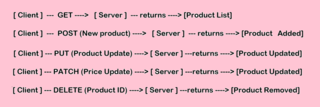
### B. HTTP Methods: The Verbs of Web Requests
HTTP methods are like verbs—they tell the system what action you want to perform.
#### The Core Methods (CRUD)
| Method | Everyday Action | System Meaning | Example in Food Store |
|--------|-------------------|------------------------|-----------------------------|
| GET | “Show me…” | Retrieve/read data | List all products |
| POST | “Add this…” | Create new data | Add a new product |
| PUT | “Replace this…” | Update/replace existing data | Update all details of a product |
| PATCH | “Change this part…” | Update part of existing data | Change only the price |
| DELETE | “Remove this…” | Delete data | Remove a product |
### The challenge:
How do you organize and handle these different requests so that everyone always gets the right answer, and nothing falls through the cracks?
---
## 2. Learning Objectives
By the end of this lesson, you will be able to:
- Organize and implement all types of requests (looking up, adding, changing, removing) in Express.
- Use and explain HTTP status codes for clear communication.
- Add and read headers for extra information and control.
- Write robust, RESTful endpoints for any resource.
- Understand the difference between GET, POST, PUT, PATCH, and DELETE.
- Know when to use each status code, and why.
---
## 3. Concept Introduction with Analogy
### Analogy: The Restaurant Waiter
Imagine you’re at a restaurant:
- You can ask the waiter for the menu (look up).
- You can place a new order (add).
- You can change your order (update).
- You can cancel your order (remove).
The waiter always responds clearly:
- “Here’s your menu.” (success)
- “Your order is ready!” (success)
- “Sorry, we don’t have that item.” (not found)
- “Order cancelled.” (removed)
- “Could you clarify your request?” (bad request)
A well-trained waiter keeps the dining experience smooth and stress-free, just as a well-designed food store system keeps requests and answers organized.
### A. What Is a Request and a Response?
- **Request**: When someone asks your food store system for information or to perform an action.
- **Response**: The system’s answer to that request.
In web systems, these requests and responses travel over the internet using a protocol called HTTP (HyperText Transfer Protocol).
### B. HTTP Methods: The Verbs of Web Requests
HTTP methods are like verbs—they tell the system what action you want to perform.
#### The Core Methods (CRUD)
| Method | Everyday Action | System Meaning | Example in Food Store |
|--------|-------------------|------------------------|-----------------------------|
| GET | “Show me…” | Retrieve/read data | List all products |
| POST | “Add this…” | Create new data | Add a new product |
| PUT | “Replace this…” | Update/replace existing data | Update all details of a product |
| PATCH | “Change this part…” | Update part of existing data | Change only the price |
| DELETE | “Remove this…” | Delete data | Remove a product |
 #### Why Use Different Methods?
- **Clarity**: Each method has a clear, agreed-upon meaning.
- **Safety**: GET requests don’t change data; POST/PUT/PATCH/DELETE do.
- **Automation**: Tools and browsers know how to handle each method.
### C. HTTP Status Codes: The System’s Answers
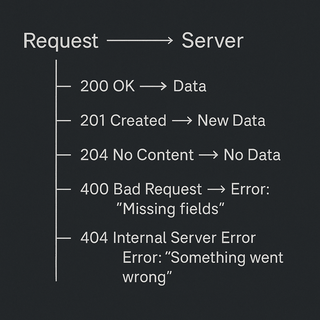
Status codes are three-digit numbers sent with every response. They help the client (browser, app, or another system) understand what happened.
#### Status Code Categories
| Code Range | Meaning | Examples |
|------------|-------------------------|-----------------------------------|
| 1xx | Informational | Rarely used in APIs |
| 2xx | Success | 200 OK, 201 Created, 204 No Content |
| 3xx | Redirection | Not common in APIs |
| 4xx | Client Error (your fault) | 400 Bad Request, 404 Not Found |
| 5xx | Server Error (our fault) | 500 Internal Server Error |
#### Most Important Status Codes in REST APIs
| Code | When to Use | Example Scenario |
|------|----------------------------------------|------------------------------------------|
| 200 | Success (GET/PUT/PATCH) | Products listed, product updated |
| 201 | Resource created (POST) | New product added |
| 204 | Success, no content (DELETE) | Product deleted, nothing to return |
| 400 | Bad request (invalid input) | Missing product name or price |
| 404 | Not found | Product doesn’t exist |
| 409 | Conflict (rare, e.g., duplicate) | Trying to add a product that already exists |
| 500 | Internal server error | Unexpected bug or crash |
#### Why Use Different Methods?
- **Clarity**: Each method has a clear, agreed-upon meaning.
- **Safety**: GET requests don’t change data; POST/PUT/PATCH/DELETE do.
- **Automation**: Tools and browsers know how to handle each method.
### C. HTTP Status Codes: The System’s Answers
Status codes are three-digit numbers sent with every response. They help the client (browser, app, or another system) understand what happened.
#### Status Code Categories
| Code Range | Meaning | Examples |
|------------|-------------------------|-----------------------------------|
| 1xx | Informational | Rarely used in APIs |
| 2xx | Success | 200 OK, 201 Created, 204 No Content |
| 3xx | Redirection | Not common in APIs |
| 4xx | Client Error (your fault) | 400 Bad Request, 404 Not Found |
| 5xx | Server Error (our fault) | 500 Internal Server Error |
#### Most Important Status Codes in REST APIs
| Code | When to Use | Example Scenario |
|------|----------------------------------------|------------------------------------------|
| 200 | Success (GET/PUT/PATCH) | Products listed, product updated |
| 201 | Resource created (POST) | New product added |
| 204 | Success, no content (DELETE) | Product deleted, nothing to return |
| 400 | Bad request (invalid input) | Missing product name or price |
| 404 | Not found | Product doesn’t exist |
| 409 | Conflict (rare, e.g., duplicate) | Trying to add a product that already exists |
| 500 | Internal server error | Unexpected bug or crash |
 ## D. HTTP Headers: Extra Info on Every Request/Response
Headers are like sticky notes attached to a package:
- **Content-Type:** Tells what’s inside (e.g., JSON, HTML).
- **Authorization:** Who is making the request.
- **Custom headers:** E.g., X-Store-Region: "Downtown".
**Example in Express:**
```typescript
res.setHeader("X-Store-Region", "Downtown");
```
## E. RESTful Routing: Mapping Real Actions to System Endpoints
REST (Representational State Transfer) is a set of conventions for organizing endpoints.
- Each **resource** (e.g., products) has its own **route** (e.g., `/products`).
- The **method** (GET, POST, etc.) tells what action to take.
**Examples:**
- `GET /products` → List all products
- `POST /products` → Add a new product
- `GET /products/:id` → Get details for one product
- `PUT /products/:id` → Replace all details for a product
- `PATCH /products/:id/price` → Update just the price
- `DELETE /products/:id` → Remove a product
## F. Error Handling and Edge Cases
- Always check for missing or invalid data.
- Always send a clear status code and message.
- Never expose sensitive server errors to the client (use 500 for unexpected issues).
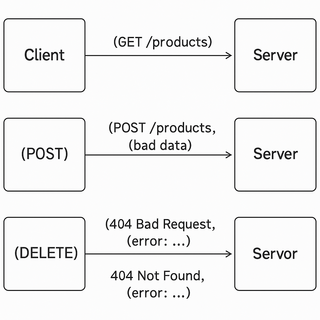
## G. Visual Recap: How a Request Flows
## D. HTTP Headers: Extra Info on Every Request/Response
Headers are like sticky notes attached to a package:
- **Content-Type:** Tells what’s inside (e.g., JSON, HTML).
- **Authorization:** Who is making the request.
- **Custom headers:** E.g., X-Store-Region: "Downtown".
**Example in Express:**
```typescript
res.setHeader("X-Store-Region", "Downtown");
```
## E. RESTful Routing: Mapping Real Actions to System Endpoints
REST (Representational State Transfer) is a set of conventions for organizing endpoints.
- Each **resource** (e.g., products) has its own **route** (e.g., `/products`).
- The **method** (GET, POST, etc.) tells what action to take.
**Examples:**
- `GET /products` → List all products
- `POST /products` → Add a new product
- `GET /products/:id` → Get details for one product
- `PUT /products/:id` → Replace all details for a product
- `PATCH /products/:id/price` → Update just the price
- `DELETE /products/:id` → Remove a product
## F. Error Handling and Edge Cases
- Always check for missing or invalid data.
- Always send a clear status code and message.
- Never expose sensitive server errors to the client (use 500 for unexpected issues).
## G. Visual Recap: How a Request Flows
 ## H. Testing and Debugging Tips
- Use tools like **Postman** or **curl** to send requests and see responses.
- Always check status codes and response bodies.
- Log requests and errors on the server for troubleshooting.
## Summary Table: HTTP Methods & Status Codes
| Action | Method | Route | Status Codes | Use Case |
|---------------------|--------|-----------------------|----------------------|--------------------------------------------|
| List all products | GET | /products | 200 | Show all products |
| Get one product | GET | /products/:id | 200, 404 | Show product or not found |
| Add product | POST | /products | 201, 400 | Add new product, validate input |
| Replace product | PUT | /products/:id | 200, 400, 404 | Replace all fields, validate input |
| Update price | PATCH | /products/:id/price | 200, 400, 404 | Change price only |
| Remove product | DELETE | /products/:id | 204, 404 | Remove product, no content on success |
## 5. Step-by-Step Data Modeling & Code Walkthrough
**A. Define Product Interface and Sample Data**
```typescript
interface Product {
id: string;
name: string;
price: number;
inStock: boolean;
}
let products: Product[] = [
{ id: "1", name: "Bananas", price: 1.5, inStock: true },
{ id: "2", name: "Apples", price: 2.0, inStock: false },
];
```
**B. Create Express Router and Implement RESTful Routes**
```typescript
import { Router, Request, Response } from "express";
const router = Router();
// GET all products
router.get("/", (req: Request, res: Response) => {
res.status(200).json(products);
});
// GET product by ID
router.get("/:id", (req: Request, res: Response) => {
const product = products.find(p => p.id === req.params.id);
if (!product) {
return res.status(404).json({ error: "Product not found" });
}
res.status(200).json(product);
});
// POST new product
router.post("/", (req: Request, res: Response) => {
const { name, price, inStock } = req.body;
if (!name || price === undefined || inStock === undefined) {
return res.status(400).json({ error: "Missing required fields" });
}
const newProduct: Product = {
id: (products.length + 1).toString(),
name,
price,
inStock,
};
products.push(newProduct);
res.status(201).json(newProduct);
});
// PUT update product
router.put("/:id", (req: Request, res: Response) => {
const productIndex = products.findIndex(p => p.id === req.params.id);
if (productIndex === -1) {
return res.status(404).json({ error: "Product not found" });
}
const { name, price, inStock } = req.body;
if (!name || price === undefined || inStock === undefined) {
return res.status(400).json({ error: "Missing required fields" });
}
products[productIndex] = { id: req.params.id, name, price, inStock };
res.status(200).json(products[productIndex]);
});
// PATCH update product price
router.patch("/:id/price", (req: Request, res: Response) => {
const product = products.find(p => p.id === req.params.id);
const { price } = req.body;
if (!product) {
return res.status(404).json({ error: "Product not found" });
}
if (typeof price !== "number" || price < 0) {
return res.status(400).json({ error: "Invalid price" });
}
product.price = price;
res.status(200).json(product);
});
// DELETE product
router.delete("/:id", (req: Request, res: Response) => {
const productIndex = products.findIndex(p => p.id === req.params.id);
if (productIndex === -1) {
return res.status(404).json({ error: "Product not found" });
}
products.splice(productIndex, 1);
res.sendStatus(204);
});
export default router;
```
**Explanation for Each Route:**
- **GET /products:** Returns all products, always 200.
- **GET /products/:id:** Returns product or 404 if not found.
- **POST /products:** Validates input, returns 400 if missing fields, 201 if created.
- **PUT /products/:id:** Replaces all fields, returns 400 if missing, 404 if not found, 200 if updated.
- **PATCH /products/:id/price:** Only updates price, returns 400 if invalid, 404 if not found, 200 if updated.
- **DELETE /products/:id:** Removes product, 404 if not found, 204 if deleted.
## 6. Challenge
**Your Turn!**
- Add a PATCH endpoint `/products/:id/inStock` to update only the `inStock` status of a product.
- Return `400 Bad Request` if the new status is missing or not a boolean.
## 7. Quick Recap & Key Takeaways
- Use HTTP methods (GET, POST, PUT, PATCH, DELETE) to match CRUD operations.
- Use status codes to clearly indicate success or failure.
- Modular routes and clear responses improve reliability and user experience.
- Always validate and structure your responses for clarity.
- Headers can add useful metadata to responses.
## 8. Optional: Programmer’s Workflow Checklist
- Use the correct HTTP method for each action.
- Validate all input before processing.
- Return appropriate status codes for every response.
- Use clear, structured JSON for all responses.
- Modularize routes for maintainability.
- Test endpoints with tools like Postman or curl.
- Log errors for debugging, but never leak sensitive info to clients.
- Use headers for extra context when needed.
## 9. Coming up next
Learn how to **type requests and responses** precisely, so your API never accepts bad data or sends confusing responses!
## H. Testing and Debugging Tips
- Use tools like **Postman** or **curl** to send requests and see responses.
- Always check status codes and response bodies.
- Log requests and errors on the server for troubleshooting.
## Summary Table: HTTP Methods & Status Codes
| Action | Method | Route | Status Codes | Use Case |
|---------------------|--------|-----------------------|----------------------|--------------------------------------------|
| List all products | GET | /products | 200 | Show all products |
| Get one product | GET | /products/:id | 200, 404 | Show product or not found |
| Add product | POST | /products | 201, 400 | Add new product, validate input |
| Replace product | PUT | /products/:id | 200, 400, 404 | Replace all fields, validate input |
| Update price | PATCH | /products/:id/price | 200, 400, 404 | Change price only |
| Remove product | DELETE | /products/:id | 204, 404 | Remove product, no content on success |
## 5. Step-by-Step Data Modeling & Code Walkthrough
**A. Define Product Interface and Sample Data**
```typescript
interface Product {
id: string;
name: string;
price: number;
inStock: boolean;
}
let products: Product[] = [
{ id: "1", name: "Bananas", price: 1.5, inStock: true },
{ id: "2", name: "Apples", price: 2.0, inStock: false },
];
```
**B. Create Express Router and Implement RESTful Routes**
```typescript
import { Router, Request, Response } from "express";
const router = Router();
// GET all products
router.get("/", (req: Request, res: Response) => {
res.status(200).json(products);
});
// GET product by ID
router.get("/:id", (req: Request, res: Response) => {
const product = products.find(p => p.id === req.params.id);
if (!product) {
return res.status(404).json({ error: "Product not found" });
}
res.status(200).json(product);
});
// POST new product
router.post("/", (req: Request, res: Response) => {
const { name, price, inStock } = req.body;
if (!name || price === undefined || inStock === undefined) {
return res.status(400).json({ error: "Missing required fields" });
}
const newProduct: Product = {
id: (products.length + 1).toString(),
name,
price,
inStock,
};
products.push(newProduct);
res.status(201).json(newProduct);
});
// PUT update product
router.put("/:id", (req: Request, res: Response) => {
const productIndex = products.findIndex(p => p.id === req.params.id);
if (productIndex === -1) {
return res.status(404).json({ error: "Product not found" });
}
const { name, price, inStock } = req.body;
if (!name || price === undefined || inStock === undefined) {
return res.status(400).json({ error: "Missing required fields" });
}
products[productIndex] = { id: req.params.id, name, price, inStock };
res.status(200).json(products[productIndex]);
});
// PATCH update product price
router.patch("/:id/price", (req: Request, res: Response) => {
const product = products.find(p => p.id === req.params.id);
const { price } = req.body;
if (!product) {
return res.status(404).json({ error: "Product not found" });
}
if (typeof price !== "number" || price < 0) {
return res.status(400).json({ error: "Invalid price" });
}
product.price = price;
res.status(200).json(product);
});
// DELETE product
router.delete("/:id", (req: Request, res: Response) => {
const productIndex = products.findIndex(p => p.id === req.params.id);
if (productIndex === -1) {
return res.status(404).json({ error: "Product not found" });
}
products.splice(productIndex, 1);
res.sendStatus(204);
});
export default router;
```
**Explanation for Each Route:**
- **GET /products:** Returns all products, always 200.
- **GET /products/:id:** Returns product or 404 if not found.
- **POST /products:** Validates input, returns 400 if missing fields, 201 if created.
- **PUT /products/:id:** Replaces all fields, returns 400 if missing, 404 if not found, 200 if updated.
- **PATCH /products/:id/price:** Only updates price, returns 400 if invalid, 404 if not found, 200 if updated.
- **DELETE /products/:id:** Removes product, 404 if not found, 204 if deleted.
## 6. Challenge
**Your Turn!**
- Add a PATCH endpoint `/products/:id/inStock` to update only the `inStock` status of a product.
- Return `400 Bad Request` if the new status is missing or not a boolean.
## 7. Quick Recap & Key Takeaways
- Use HTTP methods (GET, POST, PUT, PATCH, DELETE) to match CRUD operations.
- Use status codes to clearly indicate success or failure.
- Modular routes and clear responses improve reliability and user experience.
- Always validate and structure your responses for clarity.
- Headers can add useful metadata to responses.
## 8. Optional: Programmer’s Workflow Checklist
- Use the correct HTTP method for each action.
- Validate all input before processing.
- Return appropriate status codes for every response.
- Use clear, structured JSON for all responses.
- Modularize routes for maintainability.
- Test endpoints with tools like Postman or curl.
- Log errors for debugging, but never leak sensitive info to clients.
- Use headers for extra context when needed.
## 9. Coming up next
Learn how to **type requests and responses** precisely, so your API never accepts bad data or sends confusing responses!